
Related Articles


When we spend a lot of time driving, the way we use our phones inside the car can make a big difference. Nobody wants to keep picking up their smartphone while driving just to check a message, change a song, find a location, or make a phone call. This is where Apple CarPlay and Android Auto become useful.
Both systems are designed to bring important smartphone features to the car’s infotainment screen. They let drivers access navigation, music, calls, messages, and other supported apps through a simpler interface. At first glance, Apple CarPlay and Android Auto may look almost identical, but there are several differences between them.
In my view, the biggest difference is not really about which system is better. It is about which smartphone you already use. Apple CarPlay is designed for iPhone users, while Android Auto is made for Android smartphone users. Still, there are differences in interface, navigation, voice assistants, apps, and overall experience that are worth understanding before choosing a car or infotainment system.
What Is Apple CarPlay?
Apple CarPlay is Apple’s system for connecting an iPhone to a compatible car. Instead of using the phone directly, drivers can access selected iPhone features through the vehicle’s infotainment display.
Once connected, CarPlay provides access to features such as Apple Maps, Apple Music, phone calls, messages, podcasts, and supported third party apps. Siri also plays an important role because drivers can use voice commands to perform many tasks without touching the screen.
One thing I like about Apple CarPlay is its simple and familiar interface. If you already use an iPhone, the system feels relatively natural because many of the features are based on Apple’s existing software design.
CarPlay can also make driving more convenient because important information appears directly on the car’s screen. This means there is less reason to look down at a phone while driving.
What Is Android Auto?
Android Auto is Google’s answer to Apple’s CarPlay. It connects compatible Android smartphones with supported vehicles and displays useful phone features on the car’s infotainment screen.
Android Auto supports navigation, music, phone calls, messages, and various compatible applications. Google Maps and other navigation services can be especially useful for people who already depend on Google’s ecosystem.
Google Assistant and newer Android voice features can also make it easier to control functions using voice commands. Instead of typing an address or searching for a song manually, you can use your voice when the feature is supported.
From my experience with the Android ecosystem, Android Auto can feel very flexible. It works well with Google’s services and can be a convenient choice for people who already use Android phones and Google apps every day.
Apple CarPlay vs Android Auto: Main Difference
The simplest way to understand the difference is this.
Apple CarPlay is designed for iPhone users, while Android Auto is designed for Android users. Your smartphone therefore plays the biggest role in determining which system you can use.
If you have an iPhone, Apple CarPlay is the obvious choice. If you have an Android phone, Android Auto is generally the better match.
The two platforms have many similar functions, but they organize those functions differently. Their interfaces also follow the design philosophies of Apple and Google.
Another important difference is the ecosystem. Apple users may prefer CarPlay because it works naturally with Apple Maps, Apple Music, Siri, and other Apple services. Android users may prefer Android Auto because it connects naturally with Google Maps, Google services, and Android features.
Navigation Experience
Navigation is one of the most important features of any modern car infotainment system.
Apple CarPlay supports Apple Maps and other compatible navigation applications. Apple Maps has improved significantly over the years and provides directions, traffic information, and other useful navigation features depending on location and availability.
Android Auto is strongly connected with Google Maps and other supported navigation apps. Google Maps is particularly popular because many people already use it on their phones for everyday navigation.
In my opinion, there is no universal winner here. The better navigation system depends on which maps service you prefer and how comfortable you are with it.
If you already save places and addresses in Google Maps, Android Auto can feel very convenient. If you are already deeply invested in Apple’s ecosystem, CarPlay may feel more natural.
Music and Entertainment
Both Apple CarPlay and Android Auto can turn a car’s infotainment screen into a convenient control center for music and entertainment.
Apple CarPlay supports services such as Apple Music and other compatible audio applications. Android Auto also supports popular music and podcast applications.
The important point is that you do not have to rely entirely on the phone’s small screen. You can usually browse supported content, control playback, and change tracks through the car’s display or voice commands.
For me, this is one of the biggest advantages of smartphone integration in modern cars. Instead of trying to hold a phone or mount it in an awkward position, the important controls are placed where they are easier to see while driving.
Voice Commands
Voice control is another major part of both platforms.
Apple CarPlay uses Siri for many voice based tasks. You can use voice commands to make calls, send messages, get directions, and perform other supported actions.
Android Auto provides Google’s voice features for similar tasks. You can ask for directions, control music, communicate with contacts, and perform other supported actions.
The quality of the experience can depend on the phone, software version, internet connection, language support, and vehicle.
I personally think voice commands are most useful when they reduce the need to touch the screen. Even a good infotainment system should not encourage drivers to spend unnecessary time interacting with a display while the vehicle is moving.
Messaging and Phone Calls
Both systems are designed to make communication easier while driving.
With Apple CarPlay, users can access supported contacts, make calls, listen to messages, and respond through voice features.
Android Auto provides similar functions for Android users. Messages can be read aloud through supported services, and drivers can respond using voice commands.
This is much safer and more convenient than manually typing messages on a phone. Of course, drivers should still focus primarily on the road and only use these features when it is safe and appropriate.
User Interface
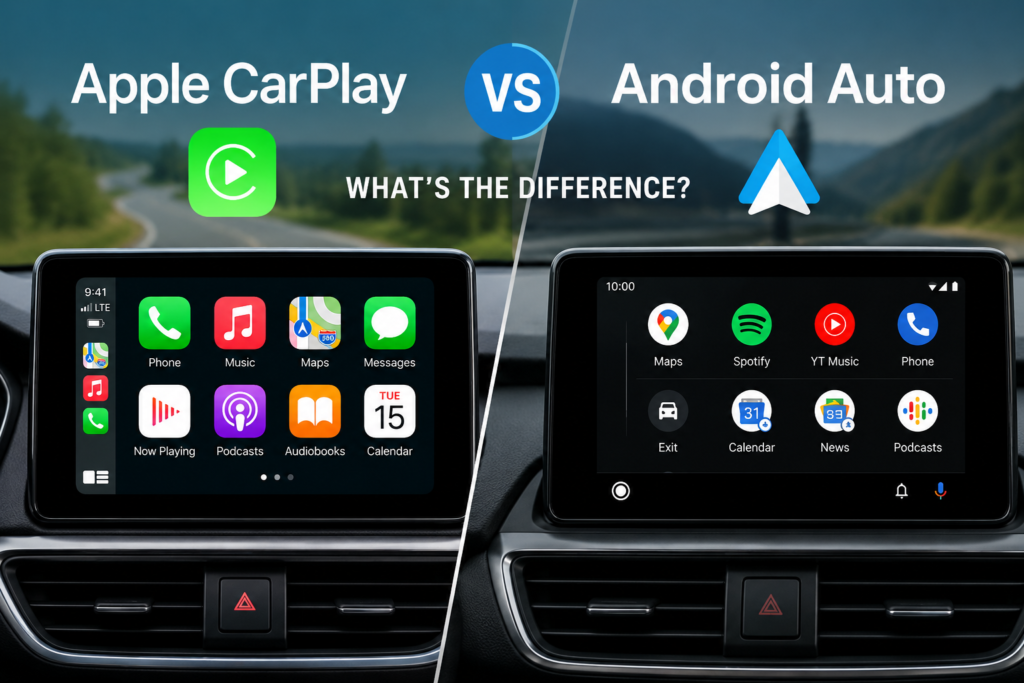
The user interface is one area where you can clearly notice the difference between Apple CarPlay and Android Auto.
CarPlay generally has an Apple style interface that is clean and familiar to iPhone users. Android Auto has a Google and Android inspired design that integrates information from different services.
Neither interface is automatically better for everyone. It mostly comes down to personal preference.
If you have used an iPhone for years, CarPlay may feel easier because the design language is familiar. Android users may feel more comfortable with Android Auto because it works alongside the Android ecosystem they already know.
Wireless Connectivity
Modern versions of both Apple CarPlay and Android Auto can support wireless connectivity in compatible vehicles and with compatible smartphones.
Wireless connectivity can be a major convenience. Instead of connecting a cable every time you get into the car, the phone can connect automatically when the vehicle and phone support the required technology.
However, wireless availability depends on the specific car, infotainment system, smartphone, and software. Not every vehicle supports wireless CarPlay or wireless Android Auto.
If wireless connectivity is important to you, I would always check the exact specifications of the vehicle rather than assuming that every model supports it.
Which One Is Better?
This is probably the question most people ask.
My honest answer is that neither Apple CarPlay nor Android Auto is automatically better for everyone.
If you use an iPhone, Apple CarPlay is the natural option. It provides a familiar Apple experience and works with many of the services iPhone users already depend on.
If you use an Android phone, Android Auto is the logical choice. It connects well with Google’s services and provides an interface designed around Android users.
The best system is therefore usually the one that matches your smartphone.
Apple CarPlay vs Android Auto Comparison
Apple CarPlay and Android Auto offer many of the same basic features, including navigation, music, calls, messages, and voice control.
The main difference is the smartphone ecosystem behind each platform.
CarPlay is focused on Apple’s ecosystem, while Android Auto is focused on Google’s Android ecosystem. Their interfaces and supported services can also differ.
For example, an iPhone user who frequently uses Apple Maps and Apple Music may feel more comfortable with CarPlay. Someone who regularly uses Google Maps and Android services may prefer Android Auto.
This is why I would not choose a car simply because it advertises one system as better than the other. I would first check whether it supports the smartphone platform I actually use.
Can a Car Support Both?
Yes, many modern vehicles offer compatibility with both Apple CarPlay and Android Auto. This is actually the best situation for families or households where different people use different smartphone platforms.
For example, one driver may have an iPhone while another uses an Android phone. A vehicle that supports both systems gives each person the ability to connect their own device.
However, compatibility can vary between vehicle models and model years. Some older infotainment systems may only support certain connectivity options.
Before buying a vehicle, it is worth checking the manufacturer’s official specifications for the exact model and trim level.
Final Thoughts
Apple CarPlay and Android Auto have changed the way many drivers interact with their cars. Instead of relying entirely on a traditional infotainment system, drivers can bring familiar smartphone features into the vehicle.
The difference between Apple CarPlay and Android Auto mainly comes down to the ecosystem you already use. CarPlay is designed for iPhone users, while Android Auto is designed for Android users. Both provide navigation, music, calls, messaging, and voice control, although the interface and services can be different.
In my opinion, the best option is not necessarily the one with the longest feature list. It is the one that feels natural with your phone and is easy to use without distracting you from driving.
If you are buying a new car, I recommend checking smartphone compatibility, wireless connectivity, navigation support, screen usability, and voice control before making a decision. A good infotainment system should make driving more convenient, not more complicated.
Ultimately, both Apple CarPlay and Android Auto are useful technologies. Your smartphone ecosystem will probably make the final decision for you, and that is perfectly fine. What matters most is having a reliable system that keeps essential features accessible while helping you stay focused on the road.